DK11 guide · checked in the app
DK11 Login: How to Sign In and Fix Login Problems
To log in to DK11, open the app or the DK11 website, enter your registered mobile number and password, and tap the gold Login button. If you signed up with Google, tap the Google button instead. The same account works in both places.
DK11 login in 4 steps
The login screen asks for two things: your mobile number and your password.
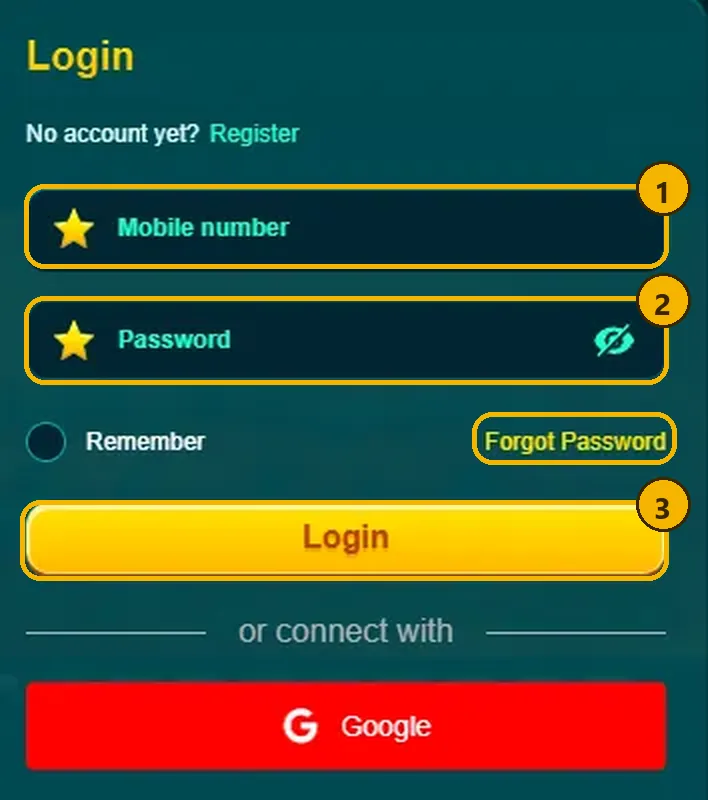
- Open DK11. No app yet? Follow our DK11 APK download guide first.
- Enter your mobile number. Use the number you registered with.
- Enter your password. Tap the eye icon to check it.
- Tap Login.
No account? Create an account first. It takes about a minute with a +92 number.
App or website: where to log in
DK11 has a web version as well as the Android app, and both use the same account and balance. On 26 Oct 2026, typing dk11.com in a browser redirected to www.dk11vip.com, where the same Login button sits top right.
| App (APK) | Website | |
|---|---|---|
| Best for | Daily play on Android | Computer, iPhone, quick checks |
| Stays signed in | Yes, with Remember | Depends on your browser |
| Installing needed | Yes, v2.4.96 | No |
The website is handy on a computer or an iPhone, where we haven’t verified an official app. Whichever you use, check the address bar or app before typing your password. Look-alike sites copy the DK11 design to steal logins.
Remember me and Google login
- Remember: turn it on only on your own phone. On a shared phone, leave it off and log out after playing.
- Google: the red Google button under “or connect with” works only if you signed up with Google or linked it. Protect that Google account with 2-Step Verification, because anyone who opens it can open DK11 too.
- One method per account: if you registered with a number and password, keep using them. Google won’t find a number-only account.
Forgot your DK11 password?
Tap “Forgot Password” under the password box. DK11 then shows the steps to set a new password for your registered number.
- Use the same mobile number you registered with.
- Pick a new password you don’t use on other apps.
- Log in once with it before closing the app.
If the reset doesn’t work, every DK11 promotion page points you to its 24-hour customer service for account and password recovery.
DK11 login not working? Try these fixes
Most login problems come from a wrong number or password, an old app or weak internet. Follow this flow from the top:
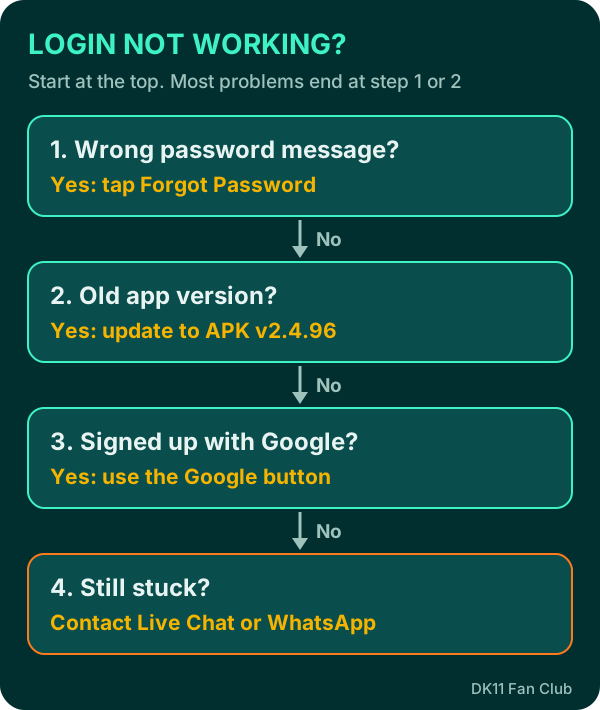
- Check the number. Use your registered number in the +92 format the app shows.
- Check the password. Passwords are case-sensitive. Still wrong? Use Forgot Password.
- Signed up with Google? Use the Google button, not the password boxes.
- Update the app. An old APK can stop working after an update. The latest we tested is 2.4.96. Reinstall the latest APK if yours is older.
- Try the website. If the app won’t open, log in at www.dk11vip.com to check your account.
- Switch internet. Try mobile data instead of Wi-Fi, or the other way round.
- Clear the cache. Settings → Apps → DK11 → Storage → Clear cache. Avoid “Clear data” unless you know your login details.
Why logging in every day matters
Several DK11 rewards only work if you log in at the right time. Missing a day can cost you a streak.
- Daily check-in: the reward grows each day for 7 days. Miss one day and the streak resets to Day 1.
- Red Packet Rain: 12 timed waves a day. You must be logged in during a wave and tap the envelope, or wait for the next one.
- Spin & Win: your daily lucky-spin tickets arrive when you log in.
- Member Day: a cash rebate drop on the 7th, 17th and 27th of each month.
All times are Pakistan Time (GMT+5). See every offer’s rules in our DK11 bonus guide.
Phone number and email verification
Some rewards need a linked phone number or a verified email, so set them up early.
- Phone: the free Rs 38 app gift is only for members with a bound phone number (and a past deposit of Rs 200 or more).
- Email OTP: some events ask you to link and verify your email with a one-time code before you can take part. Doing it once, early, saves time when an event starts.
An OTP is for your eyes only. Real DK11 support never asks you to read it out.
Why DK11 accounts get frozen
DK11 allows one account per person, IP address, device, email, phone number and payment method. Its bonus terms say it can freeze accounts and cancel balances if someone uses several accounts to claim offers.
- Don’t create a second account if you forget your password; recover the first one.
- Don’t log family members’ accounts in on your phone to claim the same bonus.
- Keep using one wallet in your own name for deposits and withdrawals.
Keep your account safe
Your account holds real money, so treat your login like a bank login.
- Use a strong password you don’t use anywhere else. Google’s safety tips explain how.
- Never share your password or any code sent to your phone or email.
- Log in only through the official app or website. Fake “DK11 login” pages in WhatsApp groups steal passwords.
Still stuck? Contact DK11 support
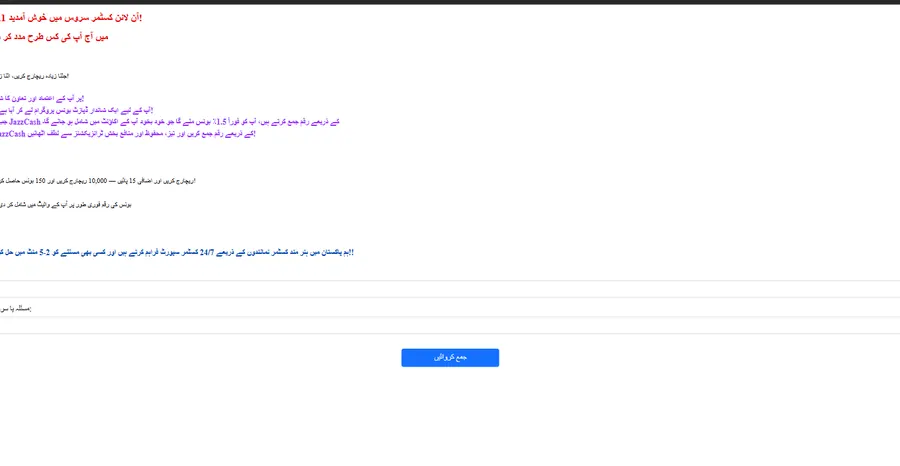
Use Live Chat in the app or website footer, or the WhatsApp, Telegram or Facebook icons on the right side. There is also an Urdu support form. Tell them your registered number and the error you see.
Our DK11 customer care guide explains what to send so support can help faster.
After you log in
Most players add balance before playing. Next step: make a deposit with Easypaisa, JazzCash or USDT. 18+ only: DK11 uses real money, and you can lose it.
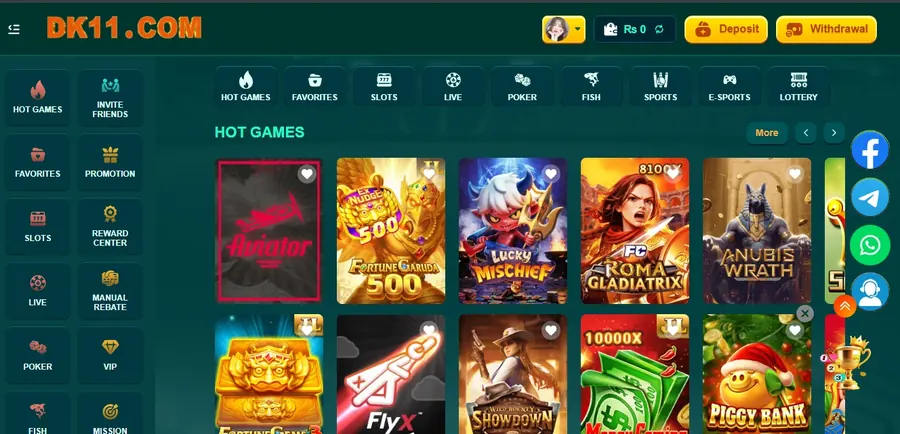
App ya website (dk11vip.com) dono par ek hi account chalta hai. Rozana login karein, warna check-in streak Day 1 par chali jati hai. Doosra account na banayein, DK11 multiple accounts freeze kar deta hai.
DK11 login FAQ
What is “dk11login”?
It’s how many people type “DK11 login” into Google. It leads to the same sign-in screen.
Can I log in to DK11 on a computer?
Yes. dk11.com redirected to www.dk11vip.com on 26 Oct 2026, and your app account works there.
Can I log in to DK11 with Google?
Yes, if your account was created with, or linked to, that Google account.
Why was my DK11 account frozen?
DK11’s terms allow freezing accounts linked to bonus abuse, such as several accounts on one device, IP or payment method. Contact support.
DK11 login nahi ho raha, kya karein?
App ko version 2.4.96 par update karein, website par try karein aur internet badal kar dekhein. Phir bhi masla ho to live chat se rabta karein.
DK11 password kaise reset karein?
Login screen par “Forgot Password” dabayein aur apna registered number istemal karein.